
“
Acta gave us a place to centralize our knowledge, make it accessible to every staff member, and update it across our departments.

Buddy SkinnerDirector of Building Codes and Permits
Greenville, SC
Greenville, SC
Give staff one searchable, department-approved place for SOPs, policies, forms, scripts, and guided workflows—directly inside the browser tools they already use.
.png)
Guidance appears where staff are already working.
When procedures are scattered across PDFs, shared drives, email threads, and experienced employees, staff lose time searching—and service quality depends too heavily on who is available.
Policies, forms, portal instructions, and scripts are hard to find in the moment.
Complex calls and counter interactions rely on memory instead of a repeatable process.
Institutional knowledge is difficult to transfer when it is undocumented or outdated.
Old versions keep circulating after policies, links, or required steps have changed.
Acta gave us a place to centralize our knowledge, make it accessible to every staff member, and update it across our departments.
Acta turns department knowledge into practical guidance staff can use during real calls, emails, walk-ins, and system workflows.
Launch the extension while working in a permit portal, CRM, website, or browser-based system.
Find a policy, SOP, approved script, form, or branching workflow by keyword or category.
Acta changes the next question and recommended action based on each answer.
This demo mirrors how guided workflows can work inside the Operations Manual: staff begin with a process topic, complete the tasks that always apply, then unlock new checklist sections based on their answers.
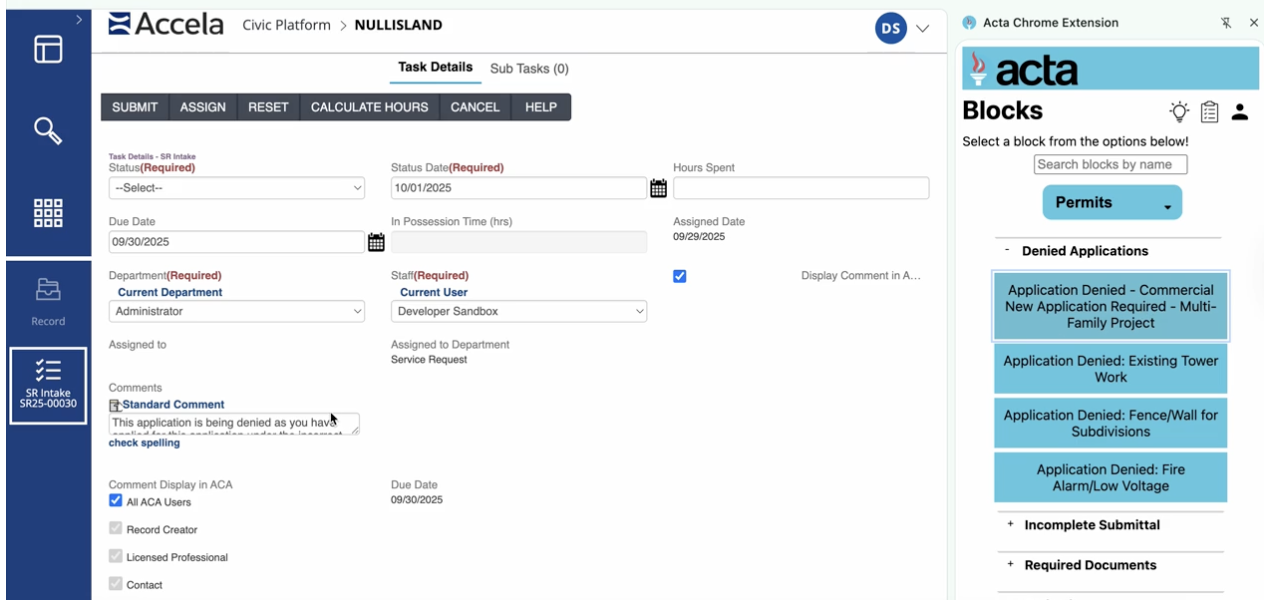
The Operations Manual brings together approved explanations, direct links, forms, scripts, SOPs, and guided workflows in one searchable place.
Find the right process without digging through folders or long PDFs.
Different answers trigger different questions and recommendations.
Keep every practical resource for a process in one place.
Department leaders update one source instead of chasing old copies.
The Operations Manual protects service quality while making complex work easier to follow.
Give staff one searchable place for guidance during live interactions.
Use the same approved steps across staff, shifts, teams, and locations.
Guide staff through complex situations one decision at a time.
Make experienced staff knowledge accessible before turnover creates a gap.
Use the Operations Manual anywhere staff need consistent guidance, from technical intake to public-facing conversations.
Permit selection, application intake, inspections, plan-review handoffs, and incomplete-submittal workflows.
Pre-application guidance, rezoning steps, ordinance references, development review, and meeting preparation.
Voter scripts, eligibility routing, absentee support, Election Day escalation, and changing deadline guidance.
Records requests, non-emergency routing, high-emotion interactions, safety guidance, and handoffs.
Acta turns the content you already have into a practical, low-lift resource staff can use every day.
No. Acta makes your approved content easier to find and use. Your department decides what guidance, links, forms, and workflows are available.
Each answer sends staff to the next relevant question. Unnecessary steps are skipped, and different paths end with different recommended actions.
Yes. Existing SOPs, PDFs, checklists, scripts, and process notes can be organized into searchable guidance and branching workflows.
Authorized department administrators manage the approved content, so staff see the current version instead of outdated saved copies.
The Operations Manual runs through the Acta browser extension alongside permit portals, CRMs, websites, GIS tools, and other browser-based systems.
In 20 minutes, we’ll look at your SOPs, checklists, and common workflows and show how Acta can make them easier to find, follow, and maintain.
Schedule Your Assessment →