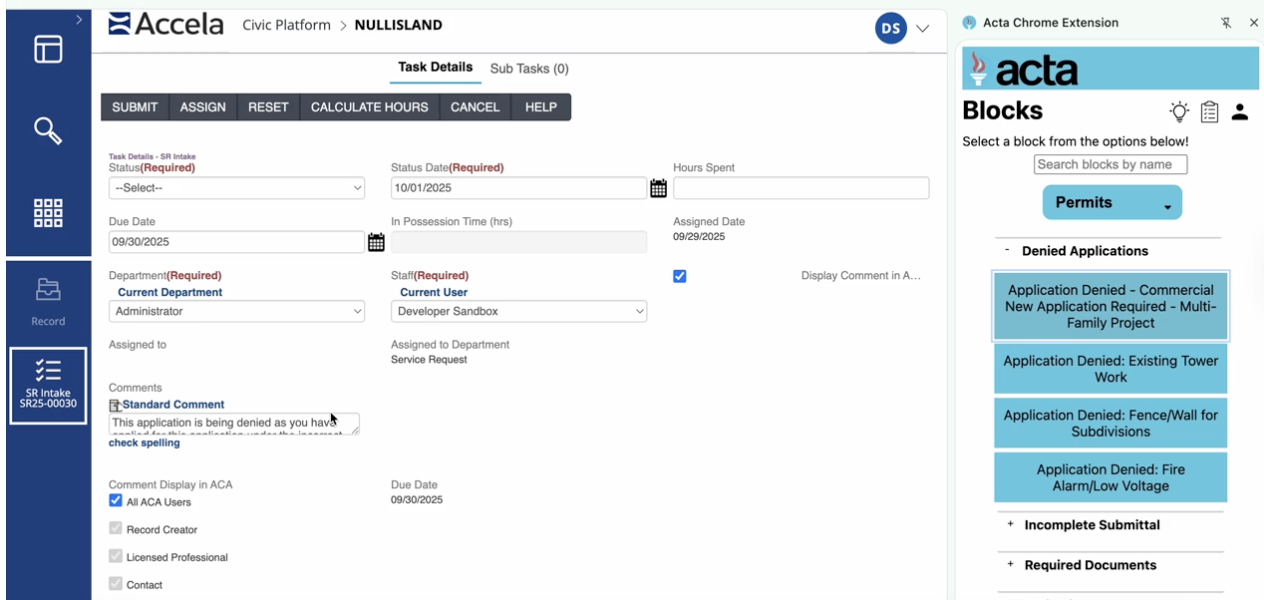
All of your department's knowledge in one platform.
Acta brings your department's approved policies, procedures, responses, and local data into one platform, so staff can use trusted knowledge wherever they work, from Outlook to the browser.
We work with you to collect the templates, SOPs, forms, process notes, and local data your staff rely on today.
→
✓ Approved by your department
2
Approve
Your department reviews and owns the content, so staff work from guidance leadership stands behind.
→
Outlook
Browser
Workflows
Parcels
3
Deliver
Staff use that knowledge through four capabilities, right inside the tools and moments where they need it.
See it work together
Follow one request through Acta.
Here's how each capability helps with one everyday resident question, from the first email to the counter visit.
A resident emails the Planning & Building Department“Can I build a detached workshop in my backyard at 418 Oak Terrace? What do I need to apply?”
Parcel Intelligence · Ask Acta AI
Check what's allowed on the property
A planning technician searches the address and gets the parcel's zoning, setbacks, and allowable uses, with the code sections cited.
Staff get: a property-specific answer in seconds, without switching between GIS layers and code sections.
Ask Acta
418 Oak Terrace
ZoningR-1 Residential
Accessory structuresPermitted
Rear setback5 ft min.
Max height15 ft
Source: Sec. 8.3, Accessory Structures · Sample data
Knowledge Management
Find the department's process
Next, staff search in the browser to confirm how accessory structure permits are handled, which forms apply, and the fees.
Staff get: the current, approved procedure and resources, instead of digging through shared drives or asking a coworker.
Department knowledge
accessory structure permit
SOPAccessory Structure Permit Review
FormResidential Building Permit Application
FeesResidential accessory structure fee schedule
LinkOnline permit portal: submitting plans
Approved Responses · Blocks in Outlook
Reply with approved language
Back in Outlook, staff choose the approved Block for accessory structures. The reply fills in with approved language, attachments, and next steps.
The resident gets: a complete, consistent answer the first time, no matter who on the team responds.
Outlook
To: Resident
Subject: Accessory Structure Permit Requirements
Thank you for reaching out. Detached accessory structures are permitted in your property's zoning district. To apply, please submit the attached application with a site plan showing setbacks from all property lines…
One subscription. One shared approach to knowledge.
However your team uses Acta, the same principles apply across every capability.
Your department approves it
Leadership decides what's approved, so every answer and step reflects current policy.
It lives where staff work
Outlook and the browser. No separate system for staff to learn or log into.
Every capability is included
One subscription covers all four. Use what fits today and add more as needs grow.
Our team supports you
Acta helps organize your content, configure the platform, and train staff.
Getting started
Start where the need is greatest. Grow from there.
You get access to the full platform from day one, and we roll it out around your department's priorities.
6 weeksAverage implementation time
60+Local governments using Acta
100k+Staff hours saved
We set it up with you, then train your staff.
1
Pick your starting point
Begin with the capability that solves your most pressing challenge, like high email volume or a process that's hard to keep consistent.
2
We build it with you
We organize your content, set up each capability, and train your staff. Parcel Intelligence is configured with your jurisdiction's GIS and code sources.
3
Expand across capabilities and departments
Add capabilities and teams as you're ready, all under the same subscription.
“Acta gave us a place to centralize our knowledge, make it accessible to every staff member, and update it across our departments.”
Buddy SkinnerDirector of Building Codes & Permits, Greenville, SC
Common questions
What teams ask about the Acta platform.
Still deciding where to start? We'll help you map Acta to your department's biggest needs.
Do we have to buy each capability separately?
No. One Acta subscription includes Approved Responses, Knowledge Management, Guided Workflows, and Parcel Intelligence.
Do we have to use every capability right away?
No. Most teams start with the capability that addresses their biggest need, then add others as they're ready.
Does Acta replace our existing systems?
No. Acta works alongside the tools your staff already use, including Outlook and browser-based systems like permit portals and CRMs.
Is any capability ready to use without setup?
Every capability is set up around your department's content. Parcel Intelligence is also configured with your GIS and code sources, which our team handles.
Who controls the content?
Your department does. Your team decides what guidance is approved and when it changes.
See how Acta could work across your department.
We'll walk through your most common requests and processes and show how each Acta capability can help your team handle them consistently.